How to Build a Tiffin Delivery App in 2026: A Simple Step-by-Step Guide
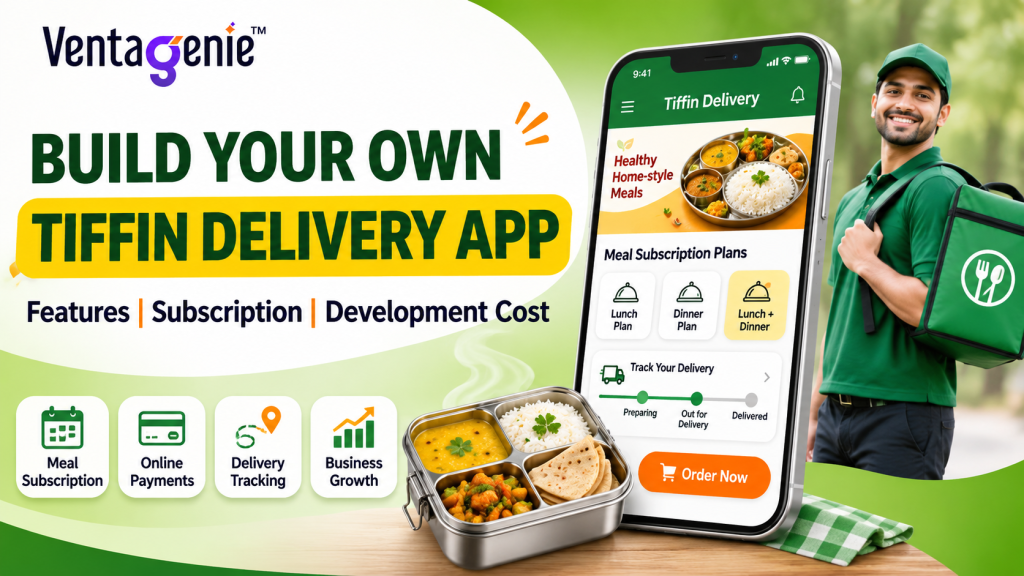
Most tiffin businesses start with a notebook, phone calls and WhatsApp. That works for 50 customers. At 200 customers, it gets messy. Some want lunch only. Some want lunch and dinner. A few pause for travel. Everyone renews on a different date.
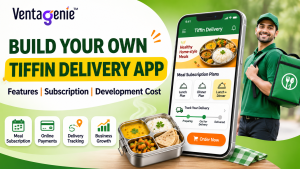
A tiffin delivery app fixes this. It is a mobile app that lets customers subscribe to meals, and helps your kitchen and riders know exactly who needs which meal each day.
A good tiffin app keeps five simple promises: arrive on time, taste the same, skip easily, bill fairly, and answer fast.
Quick answer: how to build a tiffin delivery app
- Pick the right business model.
- Write your subscription rules first (skip, pause, refunds).
- Build four apps: customer, kitchen, delivery and admin.
- Start with the must-have features only.
- Check your costs and profit before you advertise.
- Test with 30 customers, then grow slowly.
What Does a Tiffin App Need to Do? Follow One Customer's Day
Meet Meera, an example customer on a monthly lunch plan. Her day shows what your app must do.
Time | What happens | What the app must do |
8:40 p.m. (night before) | Meera will work from home tomorrow. She wants to skip lunch. | Let her skip in two taps before the 9:00 p.m. deadline and add a credit |
5:30 a.m. | The kitchen checks today’s list | Show the exact number of meals to cook |
11:15 a.m. | Meals are packed by area | Group orders into delivery routes |
12:05 p.m. | A rider starts a route | Show stops in order with addresses |
12:20 p.m. | One delivery is late | Tell the customer before they ask |
12:45 p.m. | The meal arrives | Save proof of delivery |
Evening | Meera checks her balance | Show a clear list of credits and charges, with notice before any auto-payment |
Three lessons:
- Time matters. A deadline (cut-off time) decides what the kitchen cooks.
- The kitchen cooks from a count. If skips do not reach the kitchen, food is wasted.
- Trust comes from small things: a confirmation, a late alert, a clear bill.
The Five Promises of a Good Tiffin App
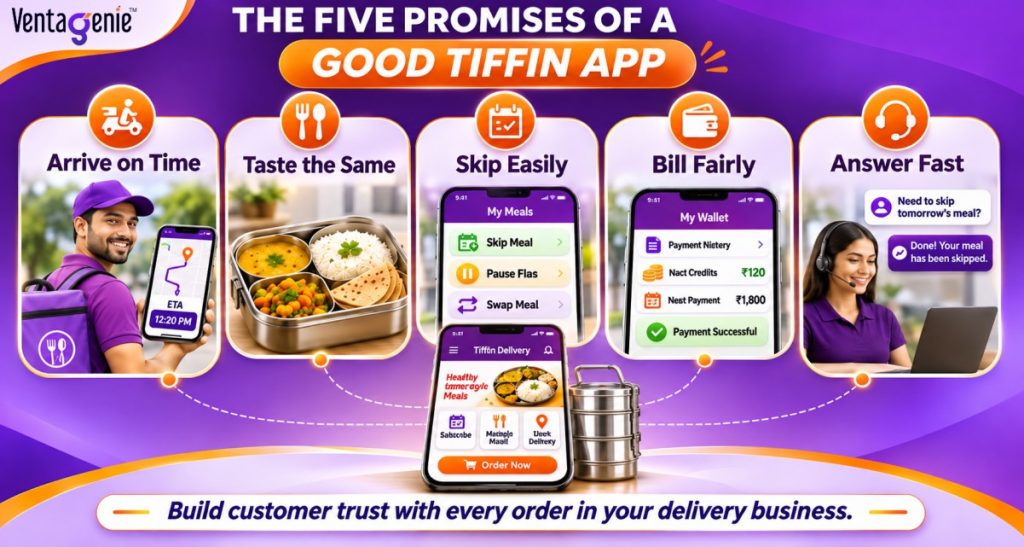
Build only what protects these promises first.
Promise | What breaks it | App feature that helps | What to measure |
Arrive on time | Long routes, no late alerts | Route grouping, late alerts | On-time delivery % |
Taste the same | Different portions each day | Standard recipes, ratings | Complaints per 100 meals |
Skip easily | Customers must call you | Self-service skip, pause, swap | % of changes done in the app |
Bill fairly | Unclear charges | Clear wallet history, payment alerts | Billing disputes |
Answer fast | Messages pile up | In-app chat or WhatsApp | Time to first reply |
Simple rule: if a feature does not protect a promise, build it later.
Which Tiffin Business Model Is Right for You?
Give each model a score from 1 (bad fit) to 5 (great fit) for these five points. Multiply by the weight and add up.
Point | Weight |
Fits the kitchen I have today | 30% |
I can control taste and quality | 25% |
Money I can invest | 20% |
Speed to launch | 15% |
Ability to manage many sellers | 10% |
Example for a person with one kitchen and a small budget:
Model | Kitchen fit | Quality | Money | Speed | Sellers | Total |
Single kitchen | 4 | 5 | 4 | 5 | 5 | 4.50 |
Corporate and bulk meals | 3 | 4 | 3 | 3 | 4 | 3.35 |
Big central kitchen | 3 | 4 | 2 | 3 | 4 | 3.15 |
Marketplace of home chefs | 2 | 2 | 3 | 3 | 2 | 2.35 |
A single kitchen wins here because it uses what the owner already has. A marketplace is harder because it is difficult to keep the taste the same across many cooks. Do your own scoring.
How to Write Your Subscription Rules?
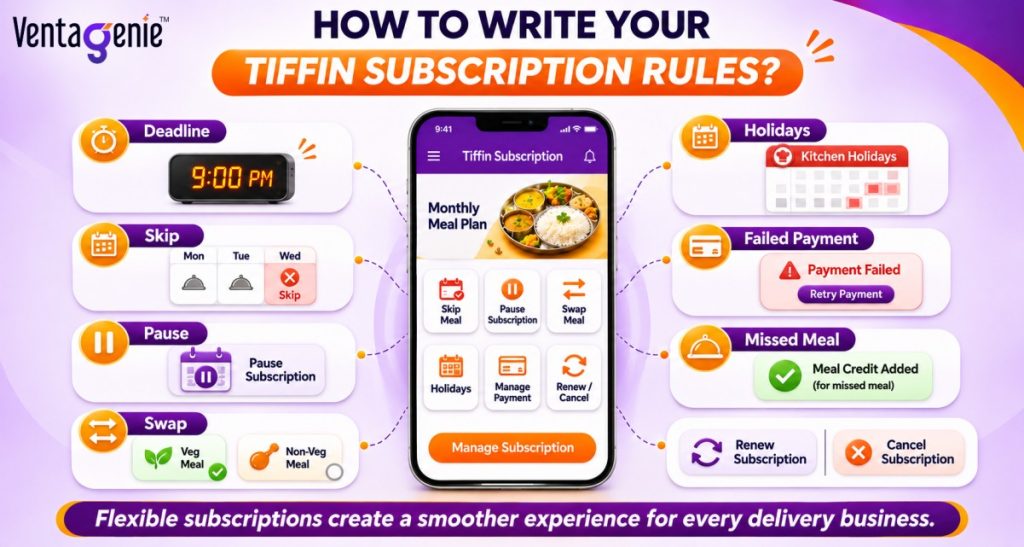
Your rules are part of your product. Write them in plain words and show them before the customer pays.
Rule | Simple wording | Why it helps |
Deadline | Changes allowed until 9:00 p.m. the night before | Kitchen knows what to cook |
Skip | Skip any meal before the deadline and get a credit | Customers stay instead of cancelling |
Pause | Pause for 1 to 4 weeks, then restart automatically | Helps people who travel |
Swap | Change veg or non-veg before the deadline | Less waste |
Holidays | Kitchen closed on listed dates; plan extended or credited | Avoids fights about billing |
Failed payment | Two retries, then 2 days of grace | You recover money politely |
Missed meal | Refund or credit within 24 hours | Shows you take responsibility |
Cancel | Cancel any time; unused balance refunded as per policy | Builds trust |
Why this matters: meal subscriptions are among the highest-churn categories, about 8 to 15% of customers leave each month. One study of 2,200 subscription businesses found that when a pause option comes before cancel, about three in four people who pause come back.
How Does a Tiffin App Work Every Day?
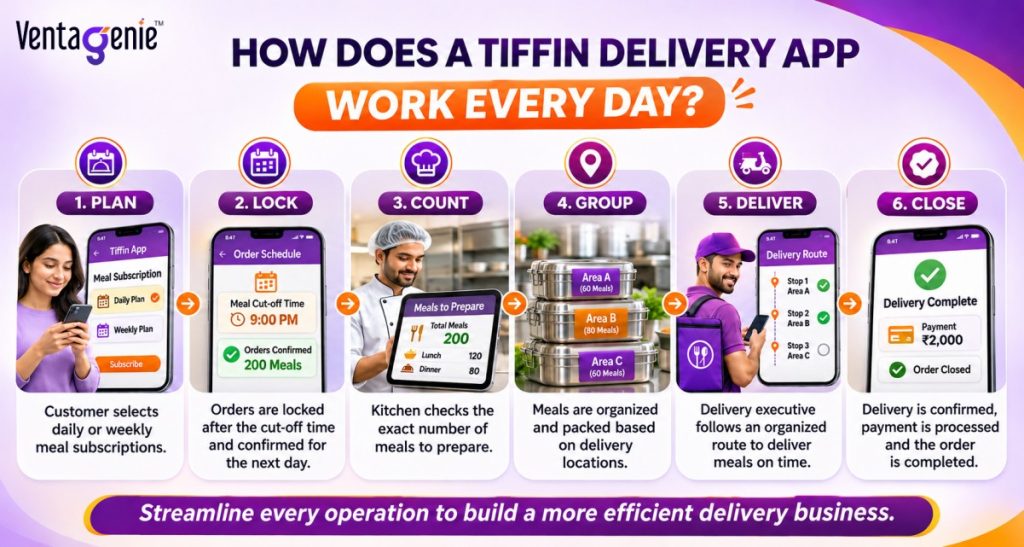
Every tiffin app follows the same daily loop:
- Plan: each customer has a weekly meal schedule.
- Lock: at the deadline, the app freezes tomorrow’s list after skips and pauses.
- Count: the kitchen sees how many meals to cook, by menu and diet.
- Group: meals are grouped into routes by area and time.
- Deliver: riders follow a list of stops, and customers get alerts.
- Close: proof of delivery is saved, balances update, and problems go to support.
Each order should move through clear steps: planned, locked, cooked, packed, out for delivery, then delivered, missed or refunded. If a developer cannot show you these steps, the app will struggle when something goes wrong.
The app stores a few simple things:
What it stores | Why it matters |
Customer and address | A wrong address means a missed meal |
Meal plan | Defines what you sell |
Subscription | The repeating agreement |
Skips and pauses | Change credits and kitchen count |
Daily order | What the kitchen cooks today |
Wallet and payments | Keeps billing correct |
Delivery proof | Settles disputes fast |
Which Tiffin App Features Should You Build First?
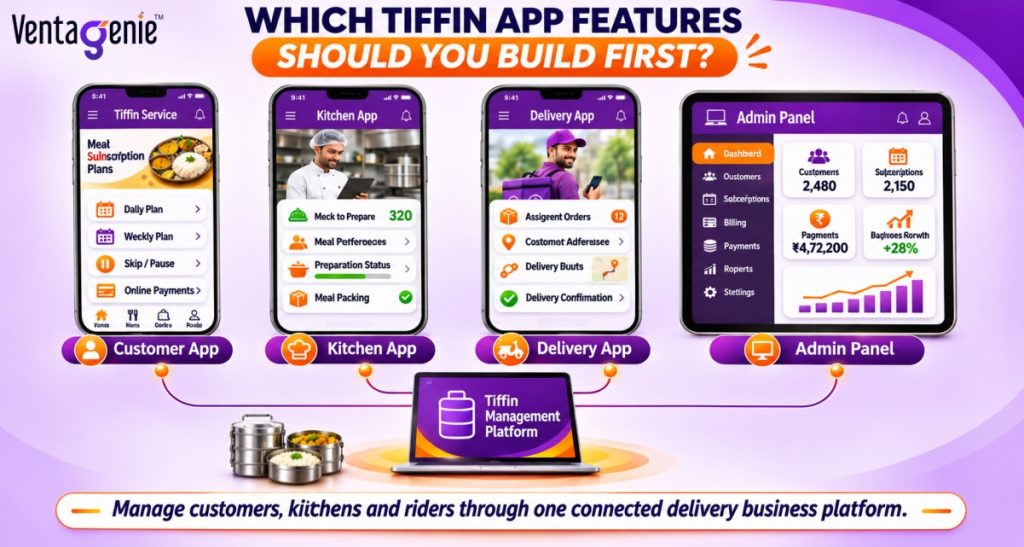
A tiffin app is four apps that share one system: customer, kitchen, delivery and admin. Effort sizes (S, M, L, XL) are rough planning sizes, not price quotes.
Feature | When | Effort | What goes wrong if it is weak |
Sign-up, plans and menu | Launch | M | Customers do not understand the plan |
Skip, pause and swap | Launch | L | Wrong meal count, billing fights |
Wallet or auto-pay and renewals | Launch | XL | Failed renewals and refund errors |
Kitchen count screen | Launch | M | Food waste or shortage |
Delivery app with stops and proof | Launch | M | Late or missed meals |
Route grouping | Launch (basic) | M | High delivery cost |
Admin billing and reports | Launch | L | You cannot see profit or churn |
Notifications (push, SMS, WhatsApp) | Launch | M | Too many support calls |
Dish ratings | Month 2-3 | S | You guess what people like |
Tiffin box return tracking | Month 2-3 | M | Lost boxes |
Corporate accounts | Later | L | Messy invoices |
Referral rewards | Later | M | Discounts without loyalty |
Many kitchens | Later | XL | Stock and area conflicts |
Example: you have 120 customers. Eighty take lunch and 55 take dinner. On Thursday, ten pause, four swap meals and six are new. The kitchen does not need to know how many plans you sold. It needs to know exactly how many meals to cook today. Your app must give that one number.
How to Create Your Own Tiffin App (Like Swiggy or Zomato)
There are three ways to build your tiffin delivery app:
Way | What it means | Speed | Starting cost | Best for |
White-label platform | A ready-made system with your own brand, plans and areas | Days to weeks | Lowest | Fast launch and testing |
Clone script | Ready-made code copied from a big app idea, then changed | Weeks | Medium | People who want their own code |
Custom build | Built from zero for your needs | Months | Highest | Special needs and bigger budgets |
A white-label platform is often no-code. You set up your brand, menus, plans, areas and payments from a dashboard. That is the easiest way to create your own tiffin app without coding.
Can you build a tiffin app like Swiggy or Zomato?
Yes. The structure is similar: customer app, kitchen app, delivery app and an admin panel. What changes is the engine in the middle.
Point | App like Swiggy or Zomato | Tiffin app |
Ordering | Choose a meal each time | Set once, repeats daily |
Money | Commission, fees, ads | Subscription plus delivery |
Engine | Send the nearest rider | Group deliveries into routes |
Kitchen | Cooks live orders | Cooks from tomorrow’s locked list |
Keeps customers | Offers | On-time meals, easy skip and pause |
Copy the proven parts: tracking, ratings, wallet and alerts. Change the engine. Build your own brand. Never copy another company’s name, logo, pictures or code.
Ask any developer these ten questions:
- Will I own the source code, in writing?
- Does it support skip, pause, swap and custom days?
- Does it handle wallet, auto-pay and failed payments?
- Does the kitchen see tomorrow's count after skips?
- Does it group deliveries by area and time?
- Can it handle my planned number of daily meals?
- Who handles security and updates?
- How fast is support?
- Can I see a live demo of a late skip and a failed payment?
- What will year two cost?
Never use pirated or “nulled” scripts. They often hide security holes.
Where VentaGenie fits?
VentaGenie, built by Sankalp, is an all-in-one delivery management platform. Its Capterra listing says it helps businesses create branded delivery apps with customer, seller and delivery apps, and supports subscription, hyper-local, marketplace and on-demand models. Its profile lists 300+ features, including route optimization, automatic stock management, secure payments and live reports.
Is a Tiffin Business Profitable? Simple Profit Math
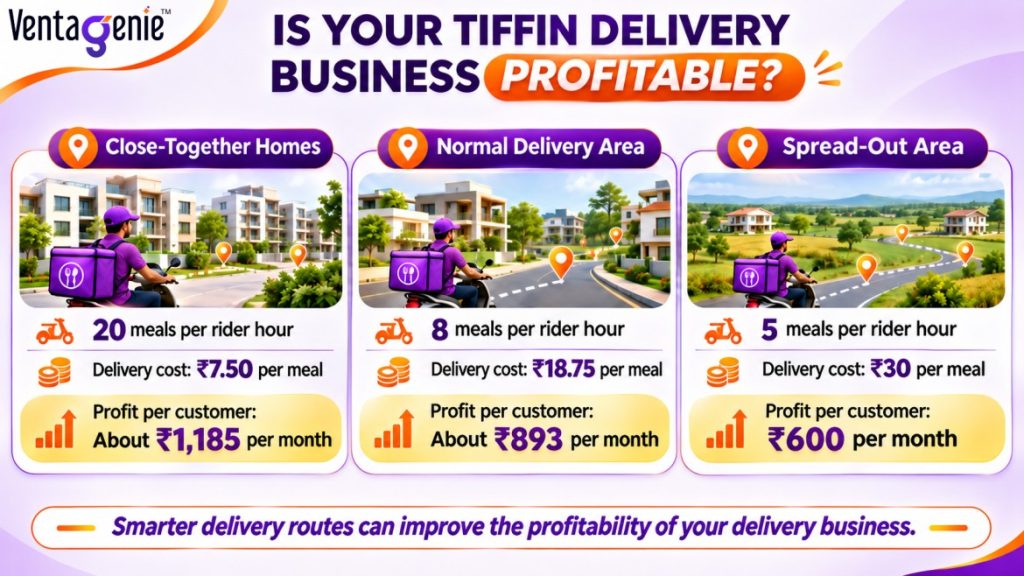
Most owners set a price and forget one thing: how many meals a rider can deliver in one hour.
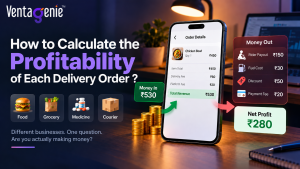
Example: a rider costs ₹150 per hour (illustrative). Your plan is ₹3,000 for 26 meals. Food costs ₹55 per meal, packaging ₹5, and payment fees are about 2%.
Area type | Meals per rider hour | Delivery cost per meal | Profit per customer per month |
Close-together homes | 20 | ₹7.50 | About ₹1,185 |
Normal area | 8 | ₹18.75 | About ₹893 |
Spread-out area | 5 | ₹30 | ₹600 |
Same plan, almost double the profit in a close-together area. Now add how long a customer stays. If 10% of customers leave each month, a customer stays about 10 months:
Area type | Profit over customer’s lifetime |
Close-together homes | About ₹11,850 |
Normal area | About ₹8,930 |
Spread-out area | About ₹6,000 |
Two lessons: grow by making areas tighter, not wider, and keep your advertising cost lower than a few months of profit per customer. These numbers are examples, so use your own.
How Much Does a Tiffin Delivery App Cost?
A simple first version of a tiffin app can start from about $2,000 to $5,000. This covers the core parts: customer plans and menu, skip and pause, kitchen count, delivery tools and an admin panel. More features cost more.
Size of project | What you get | Budget |
Simple launch | Your brand, plans, skip and pause, kitchen screen, delivery list, admin, payments | From $2,000-$5,000 |
Custom for one business | More custom screens, extra tools and reports | Higher, based on scope |
Many kitchens or marketplace | Several kitchens or sellers, commissions, vendor controls | Higher, based on scope |
These things make a project cost more:
- Complex subscription rules (credits, swaps, refunds)
- More apps and user types
- Auto-pay, refunds and payment matching
- Live tracking and route planning
- Connections to other tools
- Custom design and advanced reports
The app is not your only cost. Also plan for hosting, payment fees, support, kitchen tools, packaging, riders and at least three months of running cash.
Compare quotes on the same list. Ask each company: Which apps are included? Is it Android, iOS and web? How do skip, pause and auto-pay work? What do support and updates cost later? A cheap quote without the subscription system is not cheap.
Which Licenses and Rules Does a Tiffin Business Need?
An app does not replace food-safety or payment rules. The business owner is still responsible.
- Food license (India)
Every food business needs FSSAI registration or a license, applied for on the FoSCoS portal. Home tiffin services usually start with Basic Registration. Turnover limits are reported to have changed in 2026: one source says up to ₹1.5 crore from 1 April 2026, while older guides say ₹12 lakh. Check the “Know Your Eligibility” tool on FoSCoS to be sure.
2. Food license (other countries)
Register with your country or city food authority. In the UK, for example, online and delivery-only food businesses must register.
3. Auto-pay rules (India)
The RBI’s 2026 e-mandate framework covers repeat payments. As Taxmann explains, customers must verify when they register, and you must send a notice at least 24 hours before each auto-debit and another after it. Use a licensed payment gateway.
4. Prepaid meal balance
This is not the same as a bank-style wallet. Decide when a meal is deducted, what happens to skipped meals and when unused balance expires. Have a professional check the setup.
5. Customer data
Collect only what you need, publish a privacy policy and limit who can see addresses and phone numbers.
6. Kitchen basics
Keep a daily hygiene checklist, label containers with date and kitchen details, and use food-safe, leak-proof packaging.
This is general information, not legal advice. Rules change, so confirm with your food authority and an advisor before taking paid orders.
Test First: A 30-Day Pilot and Seven Common Mistakes
Start with about 30 customers in one small area. Judge the test on numbers. These targets are examples, so set your own.
What to check | Good after 30 days | Warning sign |
Meals on time | 95% or more | Below 90% |
Changes made in the app | 80% or more | Below 60% |
Complaints | Fewer than 3 per 100 meals | More than 6 |
Failed payments | Under 5% | Over 10% |
Customers still active in week 4 | 85% or more | Below 70% |
Try these problem tests and tick each one:
- A customer skips one minute after the deadline
- A rider does not show up
- Power goes out in the kitchen
- A renewal payment fails
- The wrong meal is delivered
- The payment gateway stops working
- A customer disputes a charge
- A holiday changes the menu and dates
Seven mistakes to avoid:
- Testing only the easy case, not problems.
- Showing rules after payment instead of before.
- Skips that never reach the kitchen.
- Delivery areas that are too wide.
- Repeating the same menu every week.
- No pause button.
- Building too much before you learn from real orders.
Ready to Build Your Tiffin Delivery App?
A tiffin business wins on trust, not on fancy features. Build a simple app that lets customers subscribe, skip and pay without calling you, lets your kitchen cook from an exact count, and lets riders follow a clear route. Then improve it using what your customers tell you.
Simple launches start from about $2,000 to $5,000. Talk to the VentaGenie team for a demo and a feature-by-feature quote. Book a free demo at VentaGenie.
Frequently Asked Questions
To build a tiffin delivery app, first choose your business model, such as daily meals, monthly subscriptions or corporate lunch delivery. Then plan essential features like meal scheduling, skip and pause options, online payments, kitchen management and delivery tracking. Choose a suitable app development solution, test it with real customers, and launch in a limited delivery area before expanding.
A basic tiffin delivery app may start at around $2,000–$5,000, depending on the features, technology and development approach. Advanced requirements such as multiple kitchens, custom subscription rules, live tracking and third-party integrations can increase the cost. Always confirm which applications, integrations, hosting and maintenance are included in the quotation.
Yes. You can use a white-label platform or a configurable mobile app development solution to launch an app under your own brand without building everything from scratch. Depending on the platform, you can configure menus, meal plans, delivery areas, payments and customer subscriptions. Before choosing one, confirm that it supports your specific business requirements.
A tiffin delivery app should include customer registration, meal plans, online payments, subscription management, meal skipping, pause options, kitchen order counts and delivery tracking. It should also provide an admin dashboard to manage customers, payments, menus and reports. These features help coordinate daily meal preparation, reduce manual work and deliver a more reliable customer experience.
A tiffin subscription app allows customers to select a daily, weekly or monthly meal plan instead of placing a new order every day. The system generates scheduled meal orders based on the customer’s plan and selected delivery days. Customers can manage skips or pauses according to the business rules, while the kitchen receives updated meal counts for preparation.
Yes. A well-designed tiffin app lets customers skip individual meals or pause their subscriptions within the permitted time frame. For example, a customer travelling tomorrow can skip lunch before the kitchen’s cut-off time. The system updates the order count and applies the relevant credit according to the business’s policy, helping reduce food waste and billing disputes.
Yes. You can develop your own branded food delivery app with customer, kitchen or vendor, delivery and admin interfaces. However, a tiffin app needs additional capabilities for recurring subscriptions, scheduled meals, daily kitchen counts and skip or pause requests. These features help manage regular meal delivery rather than only individual food orders.
A tiffin delivery business can be profitable when meal pricing, food costs, packaging and delivery expenses are managed carefully. Profitability also depends on customer retention and the number of meals delivered per route. A tiffin app can help track subscriptions, meal quantities, payments and delivery operations, allowing business owners to identify avoidable costs and improve efficiency.
The development timeline depends on the complexity of the app and the chosen development approach. A configurable or white-label solution can generally be launched faster than a fully custom application. Features such as subscription automation, payment integration, multi-kitchen management and advanced delivery tracking may require additional development and testing.
Yes. You must follow the food-safety and business-registration requirements applicable to your location. In India, tiffin businesses generally need the appropriate FSSAI registration or license, depending on their activities and eligibility. Requirements differ across countries, so check with the relevant local food authority before accepting orders.
Yes. A suitably designed app can manage multiple kitchens, service areas, delivery teams and location-wise orders. For example, a business can start with one kitchen and later expand into other neighborhoods. If you expect to scale, plan for kitchen assignment, delivery zones and centralized reporting early in the development process.
VentaGenie, offers a mobile app development solution for businesses planning branded digital experiences. For a tiffin business, the project can be planned around customer subscriptions, meal scheduling, kitchen operations, delivery workflows and administration. Contact the VentaGenie team to discuss your requirements, confirm the available capabilities and obtain a project-specific quotation.

Mr. Aniket D is a seasoned digital marketer with over 10 years of experience in market research, content strategy, and performance marketing.
He specializes in analyzing consumer behavior, identifying emerging market trends, and translating insights into actionable digital strategies.
His work focuses on blending research-driven content with SEO and lead generation to drive measurable business growth.
Known for his data-first mindset, Aniket helps brands make smarter, audience-focused decisions in competitive markets.